Get a quote and see finance options
1. Open the quote summary
Section titled “1. Open the quote summary”- Scroll the panel down to Summary.
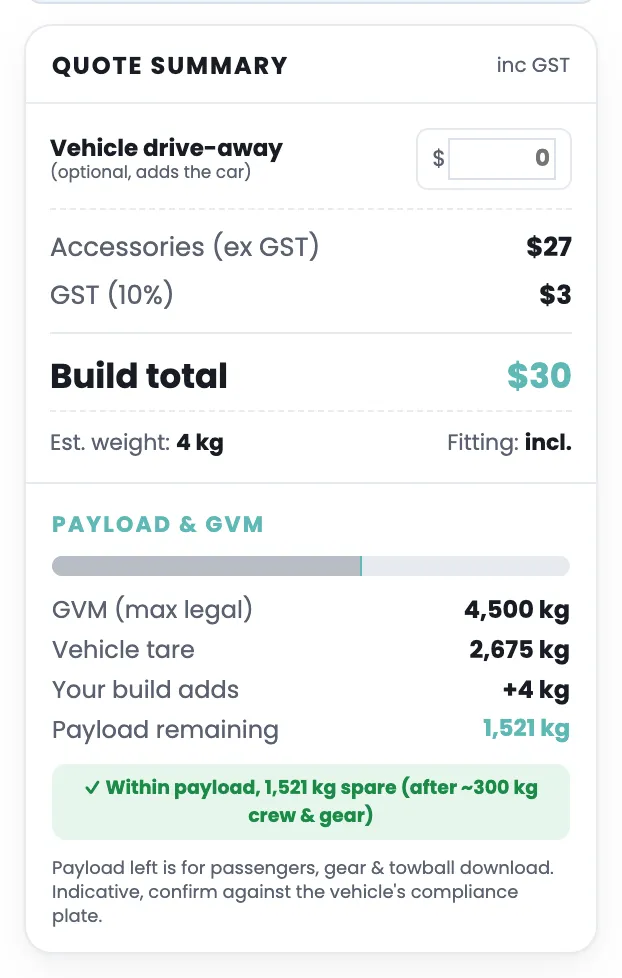
- The quote card is open when you first arrive, under the customer details. It shows the prices, all inc GST:
- Vehicle drive-away, an empty box. Type the price of the ute if you want it in the total. This is optional.
- Accessories (ex GST), GST (10%) and Build total, the price of the parts you added.
- Drive-away total, the build total plus the vehicle price you typed.
- Est. weight and Fitting: incl.
- Under Payload and GVM the card shows the ute’s GVM, its tare weight, what your build adds, and the payload left after about 300 kg of crew and gear. A tick means you are within payload. A cross means the build is over GVM, and the card lists quick fixes.
Select Quote summary to hide the card, and again to show it. The button says “Quote summary” both times.
2. See the weekly figure
Section titled “2. See the weekly figure”The weekly finance box is open when you first arrive. It shows a /week figure, the term, rate and balloon it used, and how much is financed.
- Move the Term, Rate and Balloon sliders to match what your lender offers.
- Type a Trade-in or Deposit to take them off the amount financed.
- Under the figure there is often a suggestion, for example “+ Add 4x4 Alloy Bull Bar for only $9/week”. Select it to add the part. The weekly figure updates.
The box says “Indicative only, not a finance quote or credit offer.” Your dealer or lender confirms the real numbers.
Select Show as weekly finance to hide the box, and again to show it. The button says the same thing both times.
3. Send the build to the dealer
Section titled “3. Send the build to the dealer”- Under Customer details, type your Customer name, Mobile number and Email address. You need at least a mobile or an email.
- Select Get my build.
- The message “Thanks! Your build is on its way, our team will be in touch shortly” appears. The dealer receives your build, and you get a text with a link to view it.
If a dealer is filling this in for you, they also type their dealership and their own name, so the proposal carries the right contact.
4. Keep a PDF
Section titled “4. Keep a PDF”- Select Download quote.
- Your browser’s print window opens. Choose Save as PDF as the printer, then save.
If it doesn’t work
Section titled “If it doesn’t work”- “Add your email or mobile so we can send your build.” Type at least one of them under Customer details, then select Get my build again.
- “Could not send email” or “Could not send”. The dealer’s email service is not switched on. Your build is still saved with the dealer, and you can select Download quote to keep a PDF.
- The print window does not open. Your browser may be blocking pop-ups for this site. Allow them and select Download quote again. On a phone, use Share instead and send yourself the picture and the link.
- The weekly figure looks tiny, or shows a balloon on a nearly empty build. The demo site puts a $30 fitting kit in every build, so the figure is never exactly zero. Add your parts and the figure becomes real.